
AI Agentic Actions
Status: Alpha (AI Pro)
AI Agentic Actions extends the AI's capabilities beyond read-only responses by allowing it to trigger automated workflows and ChartHop Actions from within a conversation. This enables the AI to not just answer questions, but to act — kicking off processes, sending notifications, or making defined changes based on user requests.
Enabling AI Agentic Actions
- Navigate to Admin > AI
- Ensure AI Features is enabled
- In the AI Pro section, toggle on AI Agentic Actions
- Click Save Settings
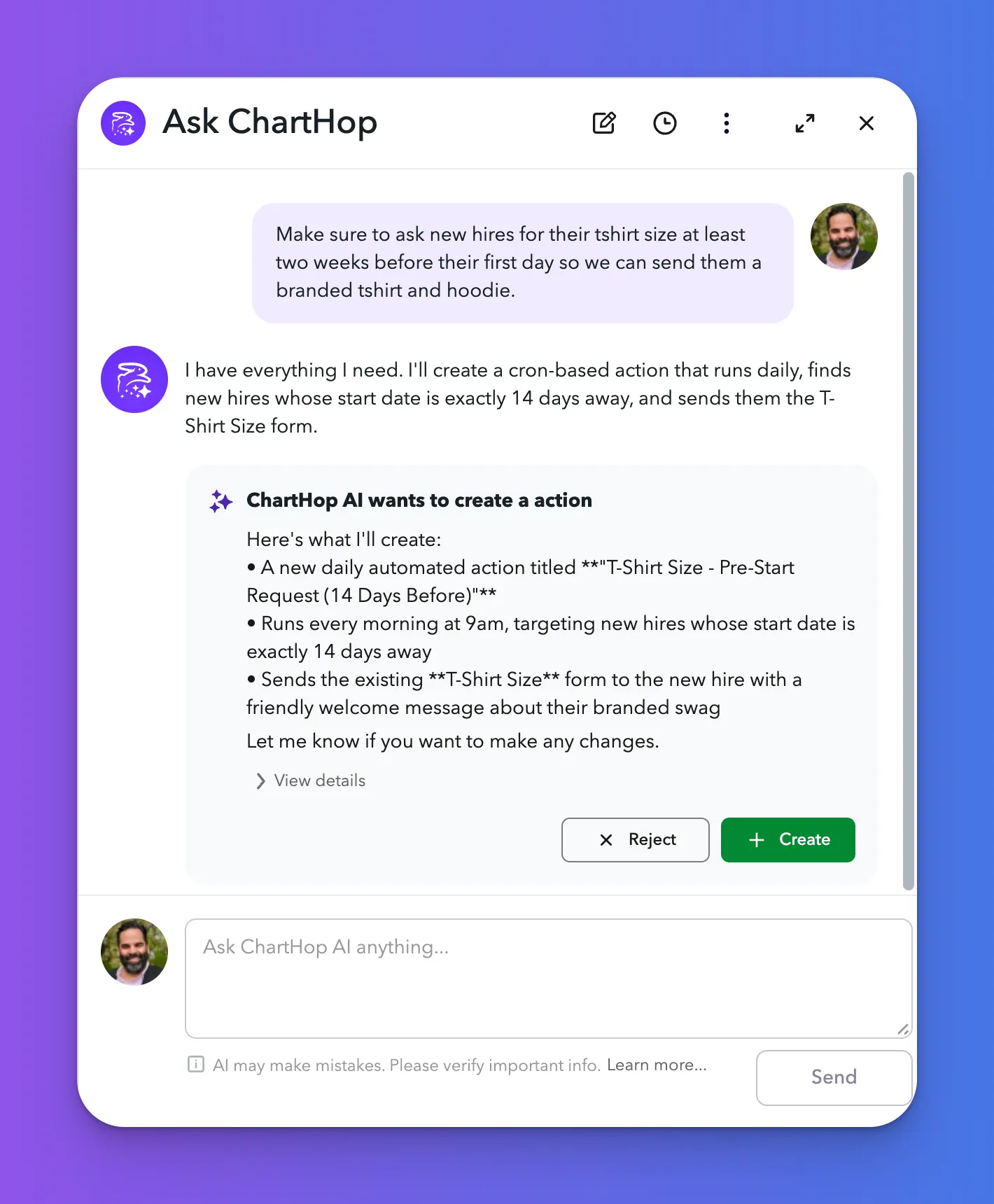
How It Works
When AI Agentic Actions is enabled, the AI can invoke ChartHop Actions that have been configured in your org. The AI identifies when a user's request maps to an available action, presents it for confirmation, and executes it upon approval.
Examples of what AI Agentic Actions can do:
- Trigger an onboarding workflow for a new hire
- Send a notification to a manager about a pending task
- Fire a custom Action based on a natural language request
Relationship to ChartHop Actions
AI Agentic Actions works in conjunction with ChartHop's existing Actions framework. Actions must be configured in Admin > Actions before the AI can invoke them. See the Actions documentation for details on building and managing Actions.