ADP Outbound Payroll Sync
This feature is currently in Alpha. Be one of the first customers to try it! Please share any feedback with the ChartHop team.
How to setup a Alpha Feature
- Read below for setup instructions and context on how the feature will work.
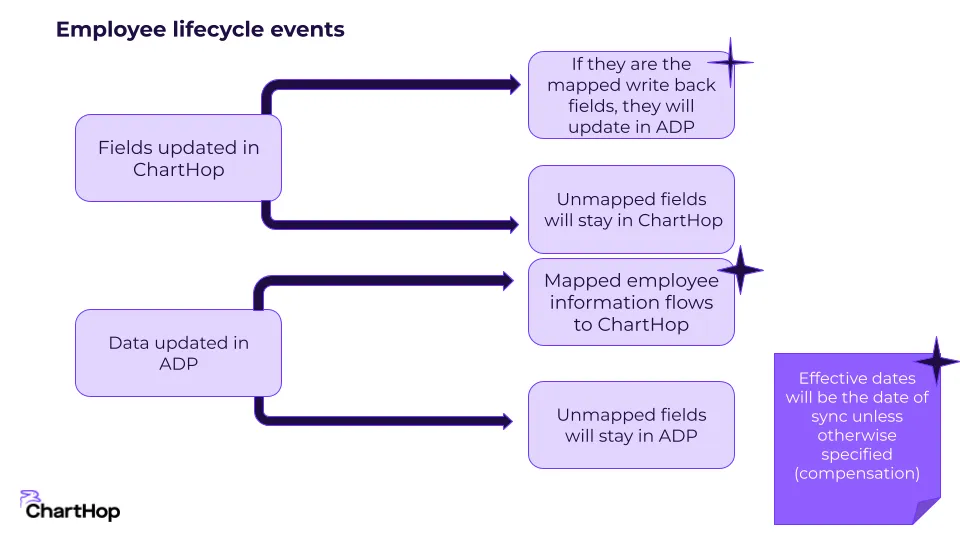
ChartHop now allows you to sync certain fields from ChartHop back to ADP. This allows you to make ChartHop your source of truth for employee date while keeping ADP up to date.
The sync can run on a scheduled basis or immediately after changes take place.
Install and purchase ADP Data connector
To configure the field mapping for Outbound fields:
Configure Outbound field mappers
To configure the field mapping for Outbound fields:
- From the left sidebar select Apps & Bundles
- Select the ADP Date Connector App if you have already installed it.
- Select the Outbound Field Mapper tab
- Toggle on or off any field mappers for the built in fields that you would like to setup.
If you would like to map custom fields, please contact the ChartHop team at this time.

Activating the Outbound Sync
To activate the outbound sync:
- From the left sidebar select Apps & Bundles
- Select the ADP Date Connector App if you have already installed it.
- Select the Settings tab
- Locate the App status & sync settings card on the right hand side & select Edit.
- Check the Automated Outbound Sync checkbox
- Select if you want an Event-based or Daily Sync.
- Press Save.
Sync type options
Event-based Sync - Will run every time a change is made in ChartHop. For example: If an employee adds their Birth Date to their profile in ChartHop, that information will automatically sync after they save it.
Daily Sync - Will run every day and update information in ADP each morning.

Current Limitations
- Access to fields depends on where it lives in ADP.
- All compensation must be in USD
- Base compensation is only supported for employees whose compensation in ChartHop is annual and whose pay schedule in ADP is monthly, semimonthly or biweekly.
- You can't make past dated changes that are different from today
- Valid: Adam's current pay is $90, the effective date for this pay was 6 months ago, 7/1/23. Today, on 1/15/24 we give Adam a raise to $100 with the effective date of 2 weeks ago, 1/1/24.
- Not valid: Adam's current pay is $90, the effective date for this pay was 1 week ago, 1/7/24. Today, on 1/15/24 we give Adam a raise to $100 with the effective date of 2 weeks ago, 1/1/24. This is not a valid change because the effective date of the change is before the most recent change.
- You can't make future dated changes ahead of time, but we will make the update when the sync runs on the current date.
- Not valid: Adam's current pay is $90, the effective date for this pay was 1 week ago, 1/7/24. Today, on 1/15/24 we give Adam a raise to $100 with the effective date of 2 weeks in the future, 2/1/24.
- Compensation fields can be effective dated.
Workflows
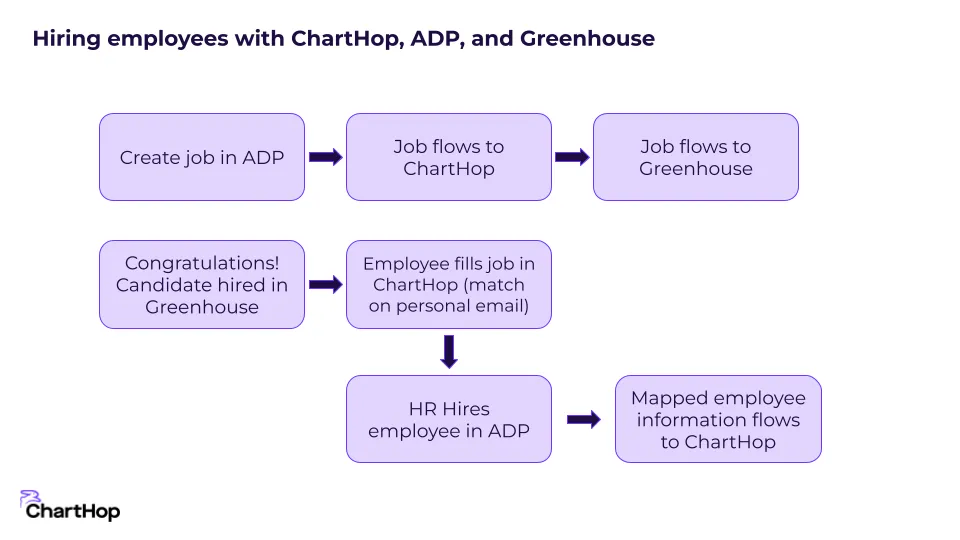
A two-way sync with ADP enables ChartHop to be your source of truth for employees, managers, and administrators.
Examples: