
ChartHop AI with Access Guard
ChartHop AI is a collection of AI capabilities across the ChartHop platform to help you and your employees gain insights about the people and job data at your organization, update information, create with AI faster than using the UI, and create automations. ChartHop AI is available on the web version of ChartHop and in the ChartHop mobile app. ChartHop AI is also available in Slack, Microsoft Teams, Claude, and ChatGPT with ChartHop AI Pro.
Types of ChartHop AI Features
ChartHop has the following AI feature types:
- Impact Buttons - buttons placed conveniently throughout the ChartHop platform to enable one-click AI insights and actions. Availability depends on your plan.
- Ask ChartHopAsk ChartHop - an open ended chat interface to start a dialogue by asking questions and responding to answers. Available to try for all customers. Access will later be restricted to only to HRIS customers.
- AI SummariesAI Summaries - See summaries of open text form responses in reviews, surveys or other forms. Available to HRIS, Performance and Engagement customers.
- AI Scenario PlannerAI Scenario Planner - Use AI to generate organization updates or scenarios. Available to Planning customers.
- Ask ChartHop on Home Page - Surfaces Ask ChartHop prompt suggestions directly on the ChartHop homepage.
- AI Chat Write ActionsAI Chat Write Actions - Allows the AI to make changes to org data directly from a chat conversation.
- AI Form Response Summaries - Automatically generates a summary of form responses (e.g., 1:1 notes, review feedback) using AI.
In addition to all the features listed above, ChartHop also offers a ChartHop AI ProAI Pro module which takes ChartHop AI capabilities even further with Ask ChartHop in Slack and Microsoft Teams*, Custom Agents, truly Agentic Actions, Bi-directional MCP Support, and more.
How to turn on AI Features
Your organization administrator must opt in to using ChartHop's AI features. AI features access may be limited to select users.
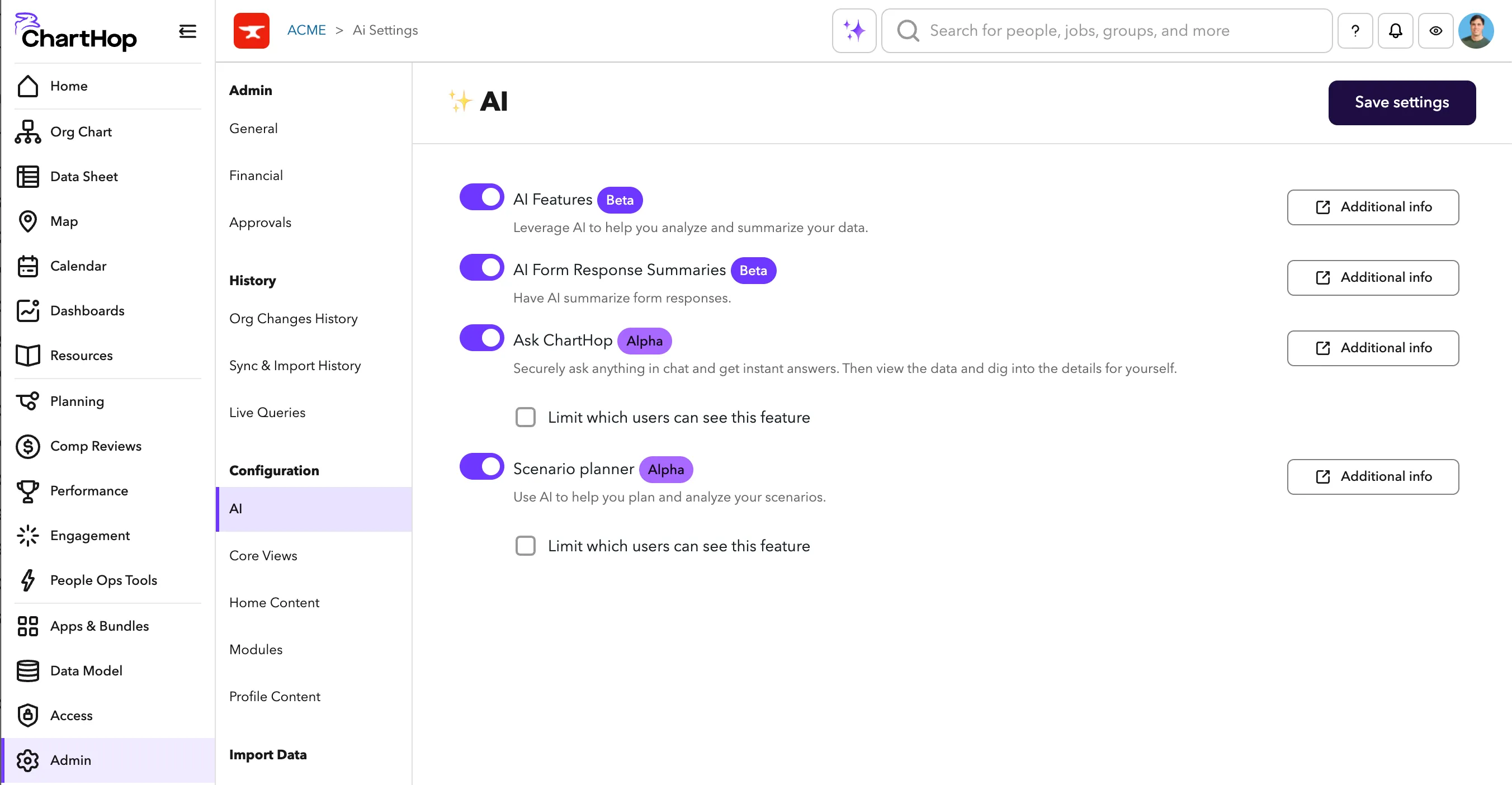
- Navigate to Admin > AI
- Toggle on AI Features and click Save settings.
- Toggle on any of the specific AI settings.
- Select "limit which users can see this feature" if you would like to only give specific people access to AI initially.
Impact Buttons

Dashboard Analysis & Insights (All Modules)
Analyze trends and surface insights across your org.
This includes the Analysis and insights button on a custom scenario's Impact Dashboard, which requires both AI Impact Buttons and the AI Scenario Planner feature.

What we have in common (All Modules)
Compare what team members have in common using AI analysis.

Working styles (Performance Module)
Understand team dynamics and working styles to better support employee success.

Scenario planner (Headcount Planning Module)
Create and analyze endless headcount scenarios with ease.
Read more at AI Scenario PlannerAI Scenario Planner
Ask ChartHop
HRIS customers get access to the open ended, Ask ChartHop chat.
Ask ChartHop is great for:
- Common employee questions - "What's our sick day policy?" pulling data from your Resources pages.
- People Ops-related questions - using any existing job, people, engagement, or performance data you have in ChartHop
- Data search type questions - "How many employees do we have who live within a 2 hour drive of San Francisco?"
For additional information and examples see Ask ChartHopAsk ChartHop.
How to set up ChartHop AI
Contact ChartHop Support or your CSM to activate the feature.
You may limit access to Ask ChartHop to specific people. Please inform your CSM about who you would like to have access to try during the beta period.

Important details
Access Guard ™️
ChartHop AI will only use information that you have access to based on your access role and permissions. This security feature is called Access Guard. Unlike AI capabilities on other platforms that use AI itself to determine what you have access to, ChartHop's Access Guard uses the users own access filter for the AI to retrieve answers and update data. If the user doesn't have access, the AI doesn't either. This removes the need for AI to determine what it should or shouldn't allow for each user and instead is limited or enabled on behalf of each user and their access role and permissions.
- For example, if you asked: "What is the average age of the employees?" but don't have access to anyone's birthday other than your own it will answer with something like: "I apologize, but it seems that the age data is not available for most employees in the system. Only one employee's age is shown in the results, which is not enough to calculate an accurate average age for the entire company."
Data Security & Training
Our AI model does not export any of your organization's data or any employee's data.
Your organizations data is not used to train or improve the AI model.
If you have questions about ChartHop's secure and mindful approach to AI see our AI Usage PolicyAI Usage Policy.
Accuracy and Hallucinations
AI models like the one used by Ask ChartHop can at times hallucinate and produce inaccurate information in responses.
We have put in guardrails and training to improve the accuracy and reduce any hallucination.
It's important for you to review and verify any responses that you receive. This is one of the reasons that Ask ChartHop will often pull up a data sheet so that you can verify the information.
There are a few steps that you can take to improve the accuracy of your responses:
- Ensure all of your Creating custom fieldsCreating custom fields are intuitively named and also include descriptive descriptions such as "Performance Rating 2024 - Contains the rating an employee received as part of their annual performance review process conducted in August of 2024."
- FieldsFields that are not in use at your organization.
Observability
Any questions you ask ChartHop AI can be reviewed by the ChartHop team for QA purposes. Admins at your organization can see the category / theme of the questions you ask.
Pricing
ChartHop AI is part of core ChartHop capabilities and can be enabled or disabled. AI Pro is an additional module that extends AI capabilities and is priced as an add-on.