
Impact Dashboard
This feature is currently in Beta. We're excited for you to try it and would love your feedback. Send it to the ChartHop team or directly to [email protected].
How to set up a Beta Feature
- From the left sidebar, select Admin, then select Labs.
- Use the switch to toggle on the feature, then press the Save settings button.
- Read below for additional setup instructions and context about what will be activated when you save settings.
The Impact Dashboard is a finance-oriented view built into Custom Scenarios. It gives planners and finance stakeholders a real-time summary of the cost and headcount impact of any changes modeled in a scenario without having to export data or build a separate report.
The Impact Dashboard is accessed via the Impact tab inside a Custom Scenario.
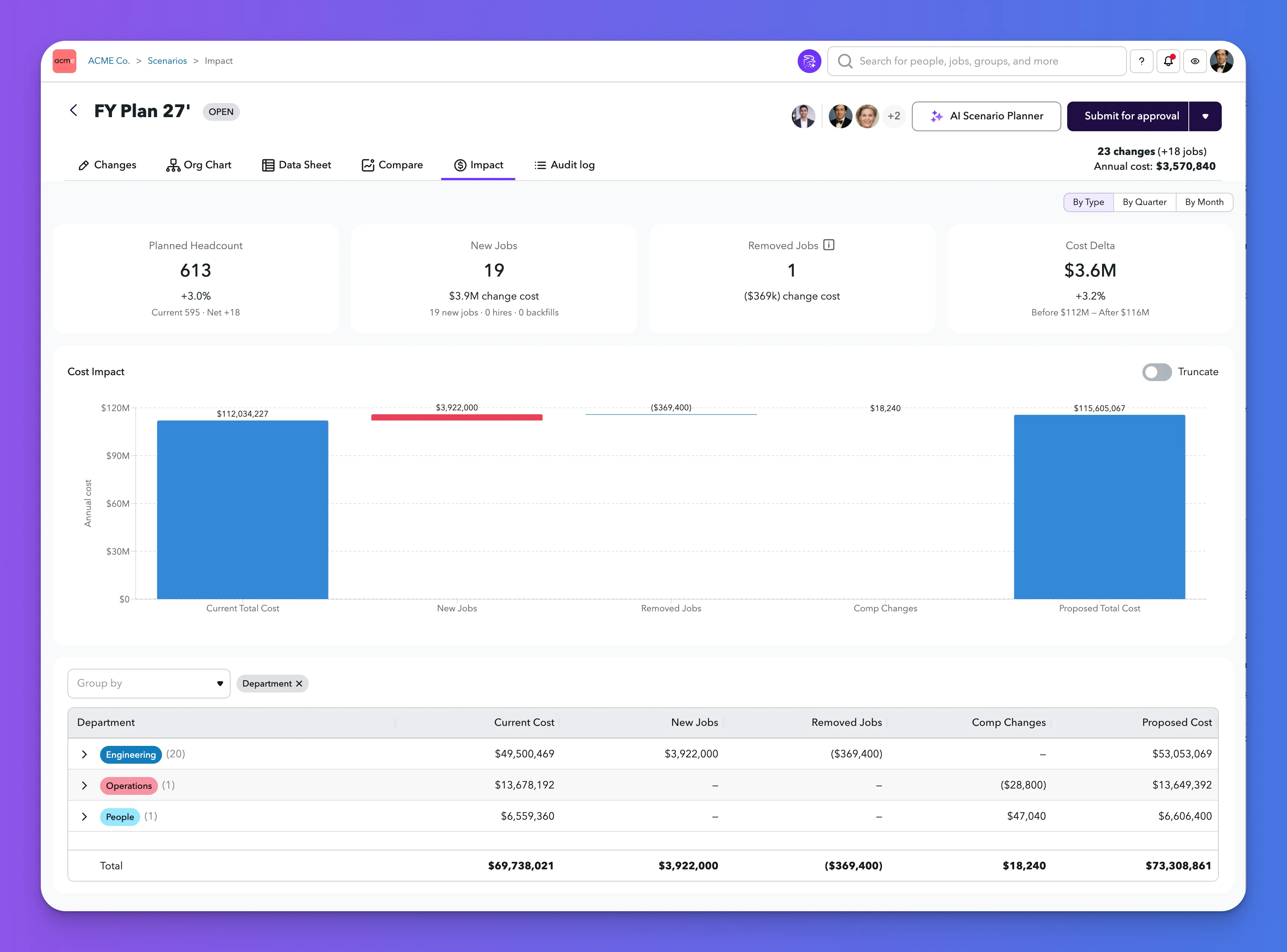
Layout
The Impact Dashboard is organized into three sections:
1. Key metrics
At the top, four summary tiles give you an at-a-glance view of the scenario's impact:
- Planned Headcount — the total headcount if all scenario changes are applied
- New Jobs — the number of new positions added in the scenario
- Departures — the number of positions removed in the scenario
- Cost Delta — the net change in annualized compensation cost between the current org and the scenario
2. Waterfall chart
Below the key metrics, a waterfall chart visualizes how cost moves from your current state to the proposed state. The chart shows:
- Current Total Cost — your baseline
- New Jobs — cost added by new hires
- Departures — cost removed by departures
- Comp Changes — cost impact of compensation adjustments
- Proposed Total Cost — the net result
3. Pivot Table
Below the waterfall, a pivot table breaks down cost changes by organizational dimension (Department by default). For each group, the table shows:
- Current Cost
- New Jobs cost impact
- Departures cost impact
- Comp Changes cost impact
- Proposed Cost
Expanding a row in the pivot table reveals the individual changes that make up that group's numbers.
View modes
A toggle in the top-right of the Impact Dashboard lets you switch between three ways to view the data:
Mode | Description |
|---|---|
By Type | Groups changes into categories: New Jobs, Departures, and Comp Changes. This is the default view. |
By Quarter | Breaks changes out across fiscal quarters, from the current quarter through however many quarters are needed to capture all planned changes. |
By Month | Breaks changes out month by month, extending as far forward as needed to show the full impact of all planned changes. |
In Quarter and Month views, the dashboard dynamically extends its window. It will show as many quarters or months as necessary to reflect the last date of any change in the scenario, rather than cutting off at a fixed horizon.
Analysis and insights (AI)
At the top of the Impact tab, an Analysis and insights button opens ChartHop AI with the scenario's cost and headcount data already in context. It summarizes the scenario's cost impact for a Finance or HR audience: which departments or teams drive the largest cost changes, whether the plan is tracking over or under budget, which individual changes carry the highest cost impact, and any notable patterns or risks. The analysis is grounded in the figures on the dashboard and the scenario's changes.
This button appears only when your organization has AI Impact Buttons enabled (Admin > AI). Because it lives inside scenario planning, the AI Scenario Planner feature must also be turned on. Access Guard applies as it does everywhere in ChartHop AI, so a viewer without compensation visibility will not see cost figures in the response.
Group By dimensions
The pivot table and breakdown views let you group results by organizational dimensions. The available dimensions are limited to field types that produce meaningful categories:
- Organizational groups — Department, Location, Band/Level, Teams, and any custom group types your organization has configured
- Single-select fields — fields like Employment Type, Exempt status, or Departure Type
- Calculated ranges — fields that bucket continuous values into categories, such as Age Range, Tenure Range, and Generation
- Scale fields — ordered categorical fields, such as Recruiting Priority
Fields that are unique per person (like employee IDs or free-text fields) are excluded, since they don't produce useful groupings.
Excluding dimensions (Admin configuration)
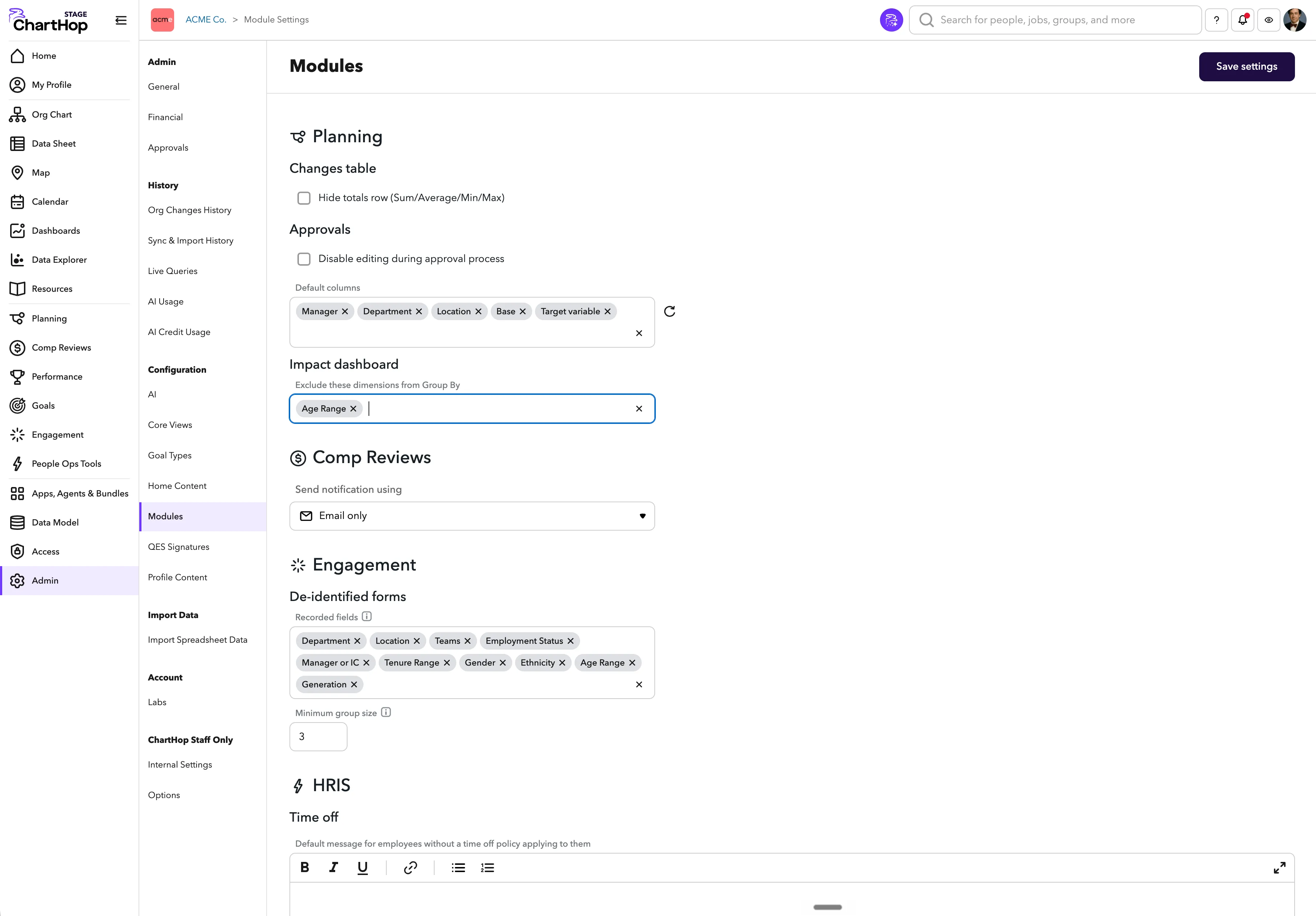
If your organization wants to restrict which dimensions are available in the Impact Dashboard — for example, to exclude Age Range or Ethnicity from planning conversations — an administrator can configure this.
- Go to Admin > Configuration.
- Under the Modules section, find the Impact Dashboard settings.
- Select any Group By dimensions you want to exclude from the list.
Excluded dimensions will be hidden from the Group By picker for all users in your organization.
Number formatting
The Impact Dashboard uses accounting-style formatting for all financial figures:
- Reductions in cost are shown with parentheses, e.g. ($40,000) rather than -$40,000
- Numbers are not colored red or green — all figures appear in black regardless of whether they represent an increase or decrease
This keeps the dashboard consistent with standard financial reporting conventions.
Who can see it
The Impact Dashboard is visible to anyone with access to the Custom Scenario. Financial data (compensation costs) is governed by each viewer's role and data access permissions — users without compensation visibility will see headcount changes but not cost figures.
How to access it
- Navigate to Planning and open a Custom Scenario.
- Select the Impact tab at the top of the scenario view.