
Coming soon- Greenhouse-V3
ChartHop <> Greenhouse
ChartHop is a people intelligence platform. Your headcount plan, org chart, and employee data all live together in one place, so HR, Finance, and leadership work from the same numbers. Teams use ChartHop to model next fiscal year, plan a reorganization, and approve roles before recruiting starts, then keep employee data current across the rest of their HR stack.
ChartHop's integration with Greenhouse Recruiting allows users to keep open roles and new hires in sync between the two systems. You choose which system owns open jobs: ChartHop can push approved headcount to Greenhouse as requisitions and openings, or Greenhouse can send its open jobs into ChartHop. In both directions, ChartHop pulls recruiting metrics onto the role, and when a candidate is marked as hired in Greenhouse, ChartHop creates the new hire and updates the org chart. Your recruiting and HR teams stop keeping two lists of open roles, and nobody retypes a new hire's details.
In this article, you can find information on how to use OAuth to update your Greenhouse integration, how to install a new Greenhouse app in chartHop, and how to choose the workflow you want.
Before you start
Requirement | Details |
|---|---|
Greenhouse permissions | A user who can manage ALL organization's API credentials. This is a developer permission rather than a role, so it can be granted to a Basic user and above. To authorize with a service account, the user completing the flow must be a Site Admin. |
Greenhouse product tier | Harvest v3 partner integrations are available for new subscription tiers: Core, Plus, and Pro. Check with your Greenhouse account team if you are on an earlier tier. |
ChartHop permissions | A ChartHop role with permission to install and configure apps. |
ChartHop plan | The Greenhouse integration is included with ChartHop plans that support applicant tracking integrations. Your ChartHop implementation specialist confirms this during setup. |
ChartHop recommends setting this integration up with help from your ChartHop implementation specialist. Job data can flow in from Greenhouse, or a bidirectional sync with webhook, and the direction you pick determines which system owns your open roles. Talk through that choice before you connect.
Configure the ChartHop integration
Setting up the integration takes four steps:
- Install the ChartHop Greenhouse app in ChartHop.
- Authorize the connection to Greenhouse using OAuth.
- Choose your job data direction and sync settings.
- Turn on the new hire webhook in Greenhouse.
Step 1: Install the Greenhouse app in ChartHop
- In ChartHop, select Apps & Bundles from the left sidebar.
- Select Apps from the sub-menu.
- Select the Available apps tab.
- Find the Greenhouse app and select Install.
- Select Install again on the app install page to confirm.
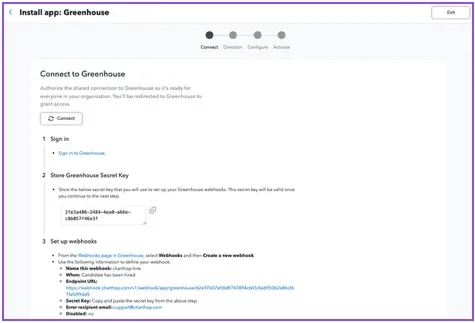
Step 2: Authorize the connection to Greenhouse
ChartHop connects to Greenhouse with Harvest v3 and OAuth 2.0. You will not enter an API key or a subdomain.
- On the ChartHop Greenhouse app page, open the Settings tab.
- In the Connection section, select Connect with Greenhouse. ChartHop opens the Greenhouse authorization screen.
- Review the permissions ChartHop requests, then log in to Greenhouse.
- You must authorize via OAuth for this integration. Select Authorize using a service account, which is available to Site Admins. A service account keeps the connection alive when the person who set it up changes roles or leaves, and it labels integration activity in Greenhouse as the service account rather than a named user.
- Complete the authorization. Greenhouse returns you to ChartHop, and the Connection section shows the connected account.
Per-user authorization and reconnecting
Each ChartHop user who works with the integration can authorize with their own Greenhouse account. ChartHop then acts with that person's Greenhouse permissions, and Greenhouse attributes their activity to them rather than to a shared connection. Use Reconnect in the Connection section to authorize, or to reauthorize after a password change, a permission change, or a revoked connection.
The organization-level connection is what runs scheduled syncs. Keep that one on a service account, and use per-user authorization for people taking action in the app.
Permissions ChartHop requests
ChartHop requests the Harvest v3 scopes below. Read scopes cover the data ChartHop pulls into the org chart and onto the role. Write scopes are used only when your job data direction is outbound, ChartHop to Greenhouse.
Area | Read | Write |
|---|---|---|
Jobs | List and read jobs | Create and update jobs |
Openings | List openings | Create, update, and delete openings |
Departments and offices | List departments and offices | None |
Hiring team | List job hiring managers and job owners | Create and remove job hiring managers, job owners, and user job permissions |
Users | List users and user roles | None |
Candidates and applications | List candidates, applications, and application stages | None |
Offers | List offers | None |
Custom fields | List custom fields | None |
Webhooks | List webhooks | Create and update webhooks |
Step 3: Choose your job data direction and sync settings
On the ChartHop Greenhouse app settings page, scroll to Basic settings and pick one direction.
Direction | What it does |
|---|---|
Outbound: ChartHop as source of truth | Active open jobs in ChartHop are pushed to Greenhouse as jobs and openings. Use this when headcount is approved in ChartHop before recruiting starts. |
Inbound: Greenhouse as source of truth | Active jobs in Greenhouse are imported into ChartHop. Use this when recruiting opens roles first. |
New hire data always flows inbound, from Greenhouse to ChartHop, whichever direction you choose for jobs.
The settings below control sync timing and how ChartHop matches a role in one system to a role in the other.
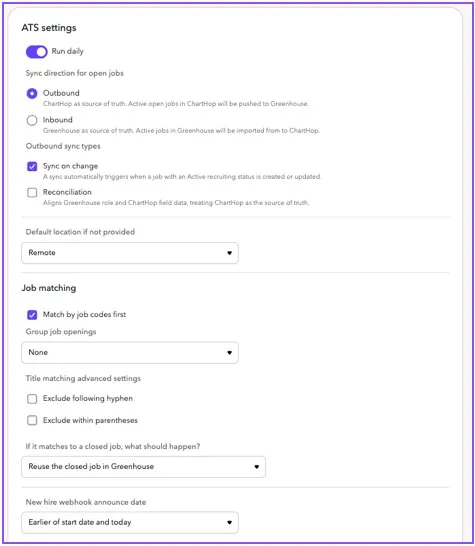
Setting | What it does | Availability |
|---|---|---|
Run daily | Runs a sync each morning and pulls candidate metrics onto the role. The scheduled run time for your organization is shown on the app page. Recommended for most setups. | Both directions |
Sync on change | Sends the job to Greenhouse as soon as any change to an active linked job is merged in ChartHop, or a job becomes active. No waiting for the next daily run. | Outbound only |
Reconciliation | Checks each day that Greenhouse matches your ChartHop data and corrects Greenhouse where it drifted. This catches a sync that did not run, and values that failed to write because a field was not set correctly. If an open job exists in ChartHop but not in Greenhouse, ChartHop creates the requisition. | Outbound only |
Default location if not provided | Assigns a fallback location, for example Remote, to records that sync without one. | Both directions |
Match by job codes first | Matches a ChartHop job to a Greenhouse job when the ChartHop job code equals the Greenhouse requisition ID. If no match is found, ChartHop falls back to the Group job openings setting. Use this if your organization has standardized titles and job codes. | Both directions |
Group job openings | Sets the fallback match method: Title, Title and location, or None. With Title or Title and location, several ChartHop jobs can share one Greenhouse job, each as its own opening. | Both directions |
Title matching advanced settings | Ignores text after a hyphen or inside parentheses when matching on title. Most organizations need this, because an open job often carries an internal title and an external title, for example "Senior Engineer - Platform (Backfill)". | Both directions |
If it matches to a closed job | Chooses what happens on a match to a closed Greenhouse job: reopen the job and create a new opening, or create a new job and opening. | Both directions |
Announced date | Sets when a person hired through the integration becomes visible to other employees in the ChartHop org chart. Use this to hold a hire private until the team is told. | Inbound hires |
Step 4: Turn on the new hire webhook in Greenhouse
The new hire webhook is what updates your org chart the moment a candidate is hired. Set it up in Greenhouse using values ChartHop gives you.
- In ChartHop, open the Greenhouse app settings page and copy the secret key under New hire webhook. Copy the endpoint URL shown alongside it.
- In Greenhouse, follow Enable a web hook and create a web hook with the values in the table below.
- Save the web hook.
Field | Value |
|---|---|
Name this webhook | ChartHop hire |
When | Candidate has been hired |
Endpoint URL | The endpoint URL shown on the ChartHop Greenhouse app settings page |
Secret key | The secret key copied from ChartHop in step 1 |
Error recipient email | |
Disabled | No |
Fields ChartHop reads and writes
Two tabs on the ChartHop Greenhouse app page show your exact field list, so you never have to guess what moves:
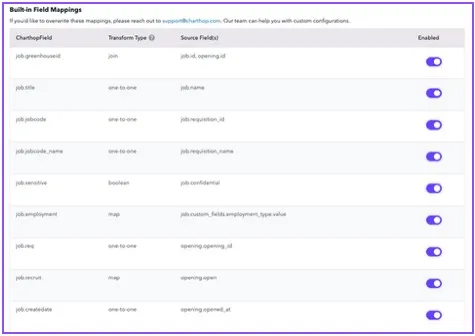
● Inbound field mappers lists everything that moves from Greenhouse to ChartHop.
● Outbound field mappers lists everything ChartHop writes to Greenhouse.
Both tabs work the same way. ChartHop ships a set of default mappers, already enabled. Toggle off any default you do not want, for example to stop a Greenhouse value from overwriting a field you maintain in ChartHop. Add custom mappers for your own Greenhouse custom fields. Your ChartHop implementation specialist configures custom mapping with you; send requests to [email protected].
The table below lists the standard mapping. On an outbound setup, ChartHop writes the fields in the Greenhouse column. On an inbound setup, ChartHop reads them.
ChartHop field | Greenhouse field | Direction |
|---|---|---|
Job title | Job name | Both |
Job code | Requisition ID | Both |
Department | Department | Both |
Location | Office | Both |
Job (individual open seat) | Opening, tracked by opening ID | Both |
Recruit status | Job and opening status | Both |
Date opened | Opened at | Both |
Hiring manager | Job hiring managers | Both |
Recruiter or job owner | Job owners | Both |
Employment type | Employment type | Both |
Confidential job flag | Confidential | Both |
Job closed or filled | Opening closed, with a close reason | Outbound |
Recruiting metrics: candidates, screens, interviews, offers | Applications and application stages | Inbound |
New hire name and email | Candidate on the hire webhook | Inbound |
New hire phone and address | Candidate on the hire webhook | Inbound |
Start date | Offer start date on the hire webhook | Inbound |
Compensation fields such as salary, bonus, and stock | Offer custom fields on the hire webhook | Inbound |
Custom fields are supported on both the Greenhouse job and the Greenhouse opening, and on offer fields delivered in the hire webhook. Because several ChartHop jobs can share one Greenhouse job when Group job openings is set to Title or Title and location, ChartHop writes per-role custom values to the opening rather than the job. Custom field mapping is configured by ChartHop's professional services team. Send mapping requests to your ChartHop implementation specialist or [email protected].
Set up Greenhouse job templates
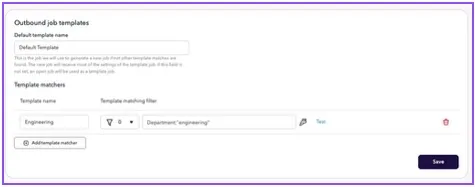
Greenhouse job templates control what a newly created requisition looks like: its stages, scorecards, and approvals. ChartHop lets you pick which template each role gets.
● Set a default template to use for every job ChartHop creates.
● Add as many additional templates as you need, each with a ChartHop filter. When a job meets the filter, ChartHop creates it in Greenhouse from that template. Use this to give engineering roles an engineering interview plan and sales roles a sales one, with no manual step in Greenhouse.
Test operations before you map fields
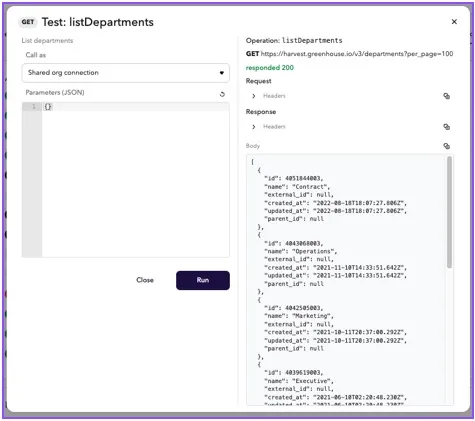
The API operations tab lists everything the integration can do in Greenhouse, and lets you run an operation as a test. Run a read against a real Greenhouse job to see the exact values it returns, then build your field mappers against what you saw rather than what you expected. This is the fastest way to get custom field mapping right the first time.
Review webhook activity
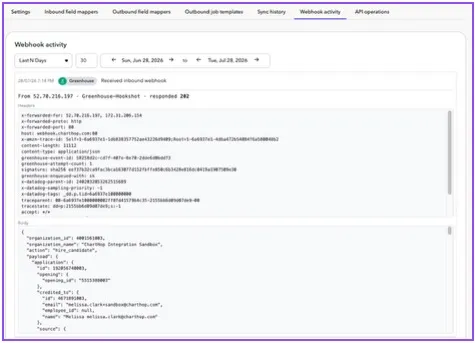
The webhook activity view records every webhook the integration sends or receives, with the headers and full body of each. When you want to confirm a hire arrived, or see exactly what Greenhouse sent, check here first. It is also the quickest way to answer a question about a specific candidate's data before contacting support.

Migrate an existing ChartHop connection to Harvest v3
Greenhouse retires Harvest v1 and v2 on August 31, 2026. If you connected ChartHop to Greenhouse with a Harvest API key, move to the OAuth connection before that date or your syncs stop.
Your ChartHop team runs this migration with you. The steps are:
- In ChartHop, open the Greenhouse app and go to the Settings tab. A banner at the top shows that the install still uses the legacy Greenhouse API, along with the August 31, 2026 date.
- Select Upgrade and confirm. ChartHop converts your existing field mappings to the Harvest v3 equivalents and keeps your sync direction and settings.
- Review the confirmation message. If any field mapping has no direct v3 equivalent, ChartHop names the count so your ChartHop team can reconfigure those fields. Until they do, those fields stop syncing.
- Select Connect with Greenhouse and complete the OAuth authorization in step 2 above. The upgrade does not carry over your API key, so the connection is not live until you authorize.
- Run a one-time sync on a single job and confirm the result in Sync history.

Your existing new hire webhook keeps working after the upgrade. The endpoint URL does not change, so there is nothing to reconfigure in Greenhouse. If you need to roll back, you can revert the install to the legacy API until August 31, 2026.
Use the ChartHop integration
Send an approved role from ChartHop to Greenhouse
On an outbound setup, ChartHop is where a role is created and approved, and Greenhouse is where it gets filled. The sequence most customers follow: headcount plan in ChartHop, generate the open roles, get them approved, merge them into the org, and let the integration carry them to Greenhouse.
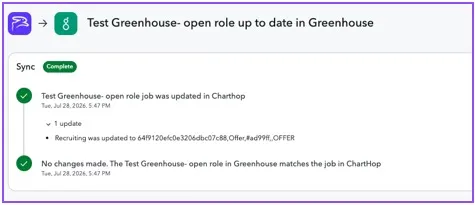
- In ChartHop, build the open roles in a headcount plan or scenario. Once they are approved and merged into your organization and the role is active, ChartHop triggers the send to Greenhouse.
- With Sync on change turned on, ChartHop pushes the job to Greenhouse as soon as the change merges. Otherwise the job goes out on the next daily sync, or when you run a one-time sync from the app page.
- ChartHop creates the Greenhouse job and one opening per ChartHop job, writes the mapped fields, and adds the hiring manager and job owner to the hiring team.
- Confirm the result in Sync history in ChartHop. Each sync run lists the jobs it touched and the exact values written.
- In Greenhouse, the requisition is ready. Your talent acquisition team adds the job post, runs interviews, and updates the role as normal, all in Greenhouse.
- As candidates enter the pipeline, ChartHop pulls the counts onto the role. Open the job's data sheet in ChartHop to see the candidates on that role.
Keep a role in sync after changes
When you change a linked role in ChartHop, for example a retitle, a department move, or a hiring manager change, ChartHop updates the matching Greenhouse job and opening on the next sync. Closing or filling the role in ChartHop closes the Greenhouse opening and supplies a close reason. Turn on Reconciliation to have ChartHop check the full set of open roles against Greenhouse on a schedule and correct any drift.
Import open jobs from Greenhouse into ChartHop
On an inbound setup, Greenhouse owns open roles.
- Open the role in Greenhouse as usual, including department, office, and requisition ID.
- ChartHop imports active Greenhouse jobs on the daily sync, or immediately when you run a one-time sync from the app page.
- Each Greenhouse opening becomes an open job in the ChartHop org chart, positioned under the hiring manager, so headcount and planning views reflect what recruiting is working on.
- ChartHop pulls candidate, screen, interview, and offer counts onto the role each morning, so leaders see pipeline progress next to the org chart.
- Because the role and its new hire now live in ChartHop, your HRIS and other connected systems pick them up from there. Greenhouse stays your recruiting system of record without becoming an integration hub.
Add a new hire to the org chart when a candidate is hired
- In Greenhouse, extend the offer and mark the candidate as hired on the job.
- Greenhouse sends the hire webhook to ChartHop with the candidate, application, and offer details.
- ChartHop matches the hire to the ChartHop job linked to that Greenhouse opening and creates the person with their name, contact details, address, start date, and any mapped offer fields such as salary and bonus.
- The role moves to a recruit status of Pending in ChartHop. This is the last recruit status update Greenhouse sends for that role, because the position is filled.
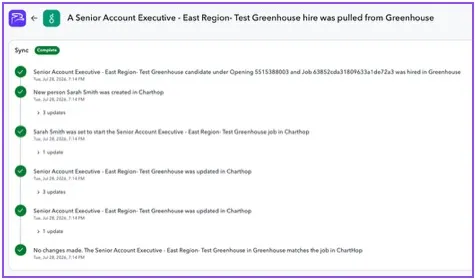
- Open the run in Sync history to see the webhook detail: the new hire, the job they are starting in, and every change ChartHop made.
Limits on the new hire webhook
● The hire must map to a job that exists in ChartHop. If the job is missing, the hire is not processed.
● A hire is not processed when the person already exists in ChartHop, even when they hold no active role. Internal transfers and rehires are handled in ChartHop rather than through the webhook.
● Only the first hire webhook for a ChartHop job is processed. If you update an offer packet and rehire the candidate in Greenhouse, remove the new hire in ChartHop before the updated details are accepted.
Troubleshooting
What you see | What to do |
|---|---|
Sync history shows a job that could not be matched | Check that the ChartHop job code matches the Greenhouse requisition ID, or that your Group job openings setting matches how your titles are written. Department and office values must match one to one between the two systems. |
A hire webhook arrived but ChartHop could not find the job | Confirm the Greenhouse opening is the one linked to the ChartHop job. The Greenhouse ID on the ChartHop job appears on the job's data sheet. Open the entry in webhook activity to see exactly what Greenhouse sent. |
Syncs stopped and ChartHop asks you to reconnect | The Greenhouse authorization was revoked or expired. Reconnect from the Connection section on the app settings page. Anyone who can manage all organization API credentials can reauthorize. |
A field stopped syncing after the v3 migration | The field mapping had no direct v3 equivalent. Contact ChartHop support to reconfigure it. |
You need to revoke ChartHop's access | In Greenhouse, go to sync settings, and uncheck sync. You can also uninstall the app. Syncs stop immediately. |
Additional resources
For additional information not covered here, reach out to [email protected].
● ChartHop Greenhouse integration documentation: https://docs.charthop.com/coming-soon-greenhouse-v3