
Scenario audit log
Scenario audit log
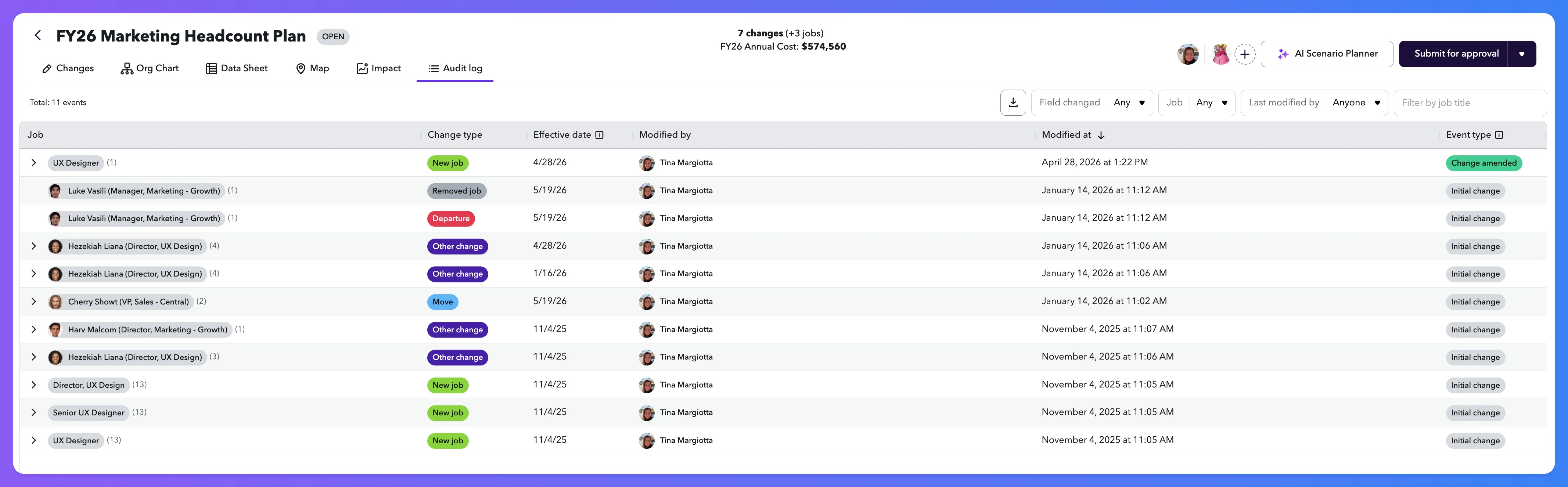
The scenario audit log shows a complete, time-stamped history of every change made inside a scenario: what was changed, who changed it, when, and what the previous value was. Use it to review collaborator activity, investigate scenario changes, or produce a record for compliance and approval workflows.
Who can access it
Anyone who can open the scenario can open its audit log. There's no separate permission. Two viewers may see slightly different logs for the same scenario; see Sensitive fields below.
How to access it
Open the scenario and click the Audit log tab in the scenario header.
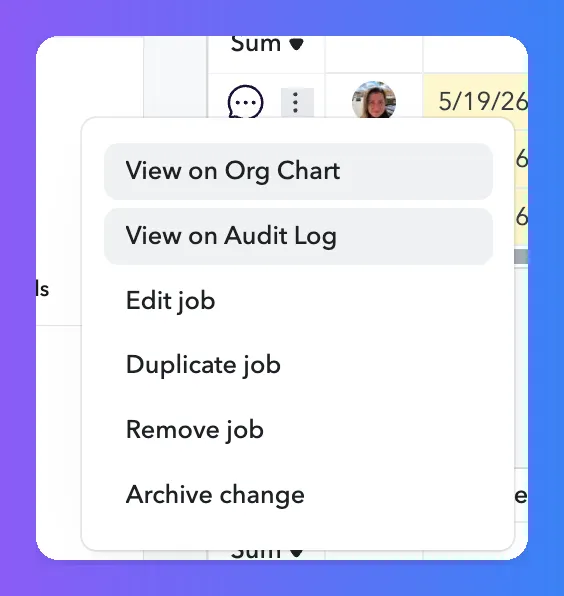
You can also jump to a specific entry from the Changes screen by opening the action menu on a row and selecting View on audit log.
What you'll see
The audit log is a table grouped by job. Each row is a single change to a single field on that job, sorted by Modified at (most recent first). Click a row to expand it and see the field-by-field breakdown.
Column | What it shows |
|---|---|
Job | The job the change applies to. Click the job title to open it in the org chart at the scenario's effective date. |
Change type | The category of change: Hire, Depart, Move, Comp, Create, Update, or Delete. Color-coded for quick scanning. |
Effective date | The date the change takes effect, stored at the moment the change was made. Editing the change later updates this value on subsequent audit entries but doesn't rewrite prior ones. |
Modified by | The user who made the change. For changes made through an integration or API token, this is the app's identity; the real user who initiated it is recorded internally as well. |
Modified at | The timestamp when the change was recorded, in UTC. |
Event type | Whether this entry is an Initial change (first time recorded), a Change amended (an earlier change was edited), or a Change cancelled (an earlier change was removed). |
Expanded row details
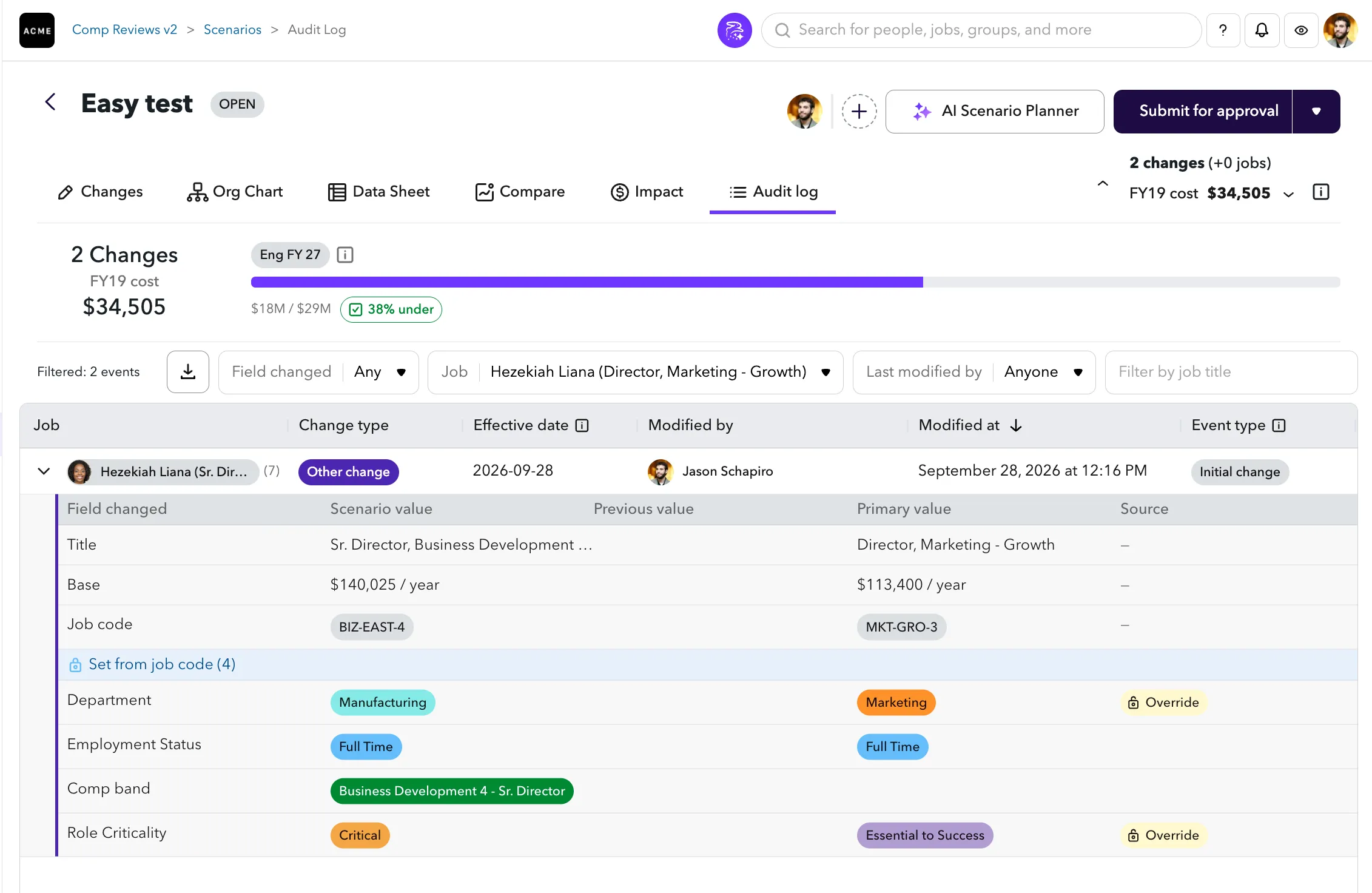
Expanding a row reveals one line per field touched by the change, with four side-by-side values:
- Scenario value: the new value recorded by this change.
- Previous value: the value in the scenario before this change.
- Primary value: the value in your main organization data as of the scenario's effective date. Use this to spot when a scenario change has drifted from live data. Not shown for newly-created entries, which have no primary counterpart.
- Source: whether the field was overridden from its job code default. Blank for fields you set directly and for linked fields that kept the default.

A multi-field edit produces one row per changed field, all sharing the same Modified at timestamp. An amended entry only contains the fields that changed in that particular edit, not the full state of the change.
Fields linked to a job code
If your organization uses linked job code fields, the expanded row groups fields to show you exactly what was set directly and what was filled in automatically from a job code.
- Fields you set directly appear first, with a blank Source. When a job code was also changed, the Job code row appears last in this group, sitting directly above the linked fields it populated.
- A highlighted header row labeled Linked fields (N) (where N is the count) separates the two groups. Hovering over it shows "Linked to the job code".
- Each field beneath that header was filled in from the new job code.
What you see | What it means |
|---|---|
Field above the group, no Source | Set directly in this change |
Linked fields (N) header | The fields below were filled in from the new job code |
Linked field, blank Source | Kept the job code's default value |
Linked field, Override tag | Changed from the job code's default |
Hovering the Override tag shows "Changed from the job code default". If the change touched no linked fields, there is no Linked fields header and the row looks the same as before.
Filtering and searching
Use the controls at the top of the table to narrow results:
- Job: limit to changes on one or more jobs.
- Field changed: limit to specific fields (e.g. salary, manager, title).
- Modified by: limit to changes made by a specific person.
- Job title: free-text search across job titles.

Exporting
Click Export audit log to download the full log as a CSV. The export runs asynchronously and contains one row per changed field. A single edit that touched five fields produces five rows, all sharing the same change ID and timestamp.
Sensitive fields
The audit log respects your existing field-level permissions. If you can't see a compensation or other sensitive field on the job itself, you won't see changes to that field in the audit log either. When every changed field on an event would be hidden from you, the entire event row is omitted. Two users with different access levels may see different row counts for the same scenario. This is expected behavior.
Lifecycle
Audit history is retained permanently. Archiving, merging, or deleting a scenario doesn't remove its audit log; users who can still access the scenario can still view its history. Preview and Test scenarios aren't audited.
Tips
- The audit log is read-only. To undo a change, go back to the Changes screen and edit or remove it there. The removal will appear in the audit log as a Change cancelled entry.
- New entries can take a few seconds to appear after a change is saved.
- Looking for approval and rejection comments with the full approval chain? See the Approval audit log.