
Time off admin FAQs
Employee Balances and policies
An employee changed locations and changed time off policies. How is that handled?
Time off policies adjust automatically. When an employee changes locations and therefore changes policies, they will automatically be moved to the new policy. Their STARTING balance will adjust to the new policy, therefore the current balance will be different. Admin will need to manually adjust if any change is needed otherwise.
Can I move their requests over?
Yes! If you'd like, you can export their requests from the payroll export, and upload them in admin --> import data into their new time off policy. If you are doing this, you would just adjust their starting balance or accrual rate, and the policy will re-adjust on its own.
Tip: You can set up actions to send a notification to administrators when an employee meets critiera to move to a new policy! See the workflows below.
An employee didn't end up taking the time they had requested. Can I change it?
Yes! If the date has passed and the request was approved, Owners and People Ops Admin roles can withdraw the request.
I need to adjust an employees balance.
Go to the time off policy --> adjustments, set the desired date and make the adjustment in the MIDDLE column.
NOTE: An adjustment sets the balance as of that date. All approved time off requests from before that date will not be considered in the balance anymore, only future requests.
Different policy setups
Time Off In Lieu (TOIL) or earned/event-driven policies
These policies start at a zero balance and days are awarded only when a specific action occurs. Such as working overtime, working on a holiday or making a weekend push to finish a big project.
Days are usually added at the discretion of HR or management and usually defined in a handbook or on the policy.
To create this policy:
- Set the policy type to In Lieu. (this is organizational only)
- Set How much time should employees get per year? to 0.
- Add any additional policy settings such as who it applies to, expiration, maximum days and descriptions. Adding a employee-facing description can help clarify any rules around the policy.
- Make the policy Active.
To award days to a person:
- As an admin, navigate to policy details modal for that person and click Add Adjustment.
- Add an adjustment for the number of days with an effective date of the day that the time is being awardeded for. If you need to award a partial day, you can use decimals such as 0.5 days.
- The employee can now request from this policy
Tenure based policies
Employees can earn more days of PTO as their tenure in the company increases.
Example 1: Under 5 years tenure starts with 20 days, but between 5-10 years tenure they start with 25 days. This is awarded on the date of their anniversary. On their 6th year, they will start with that amount at the start of the policy year.
Example 1 setup:
Create one policy that applies to all of these employees. Then create actions that will do the following:
- Every day, look for employees who's start date was 5 years ago, and who meet the time off policy filter
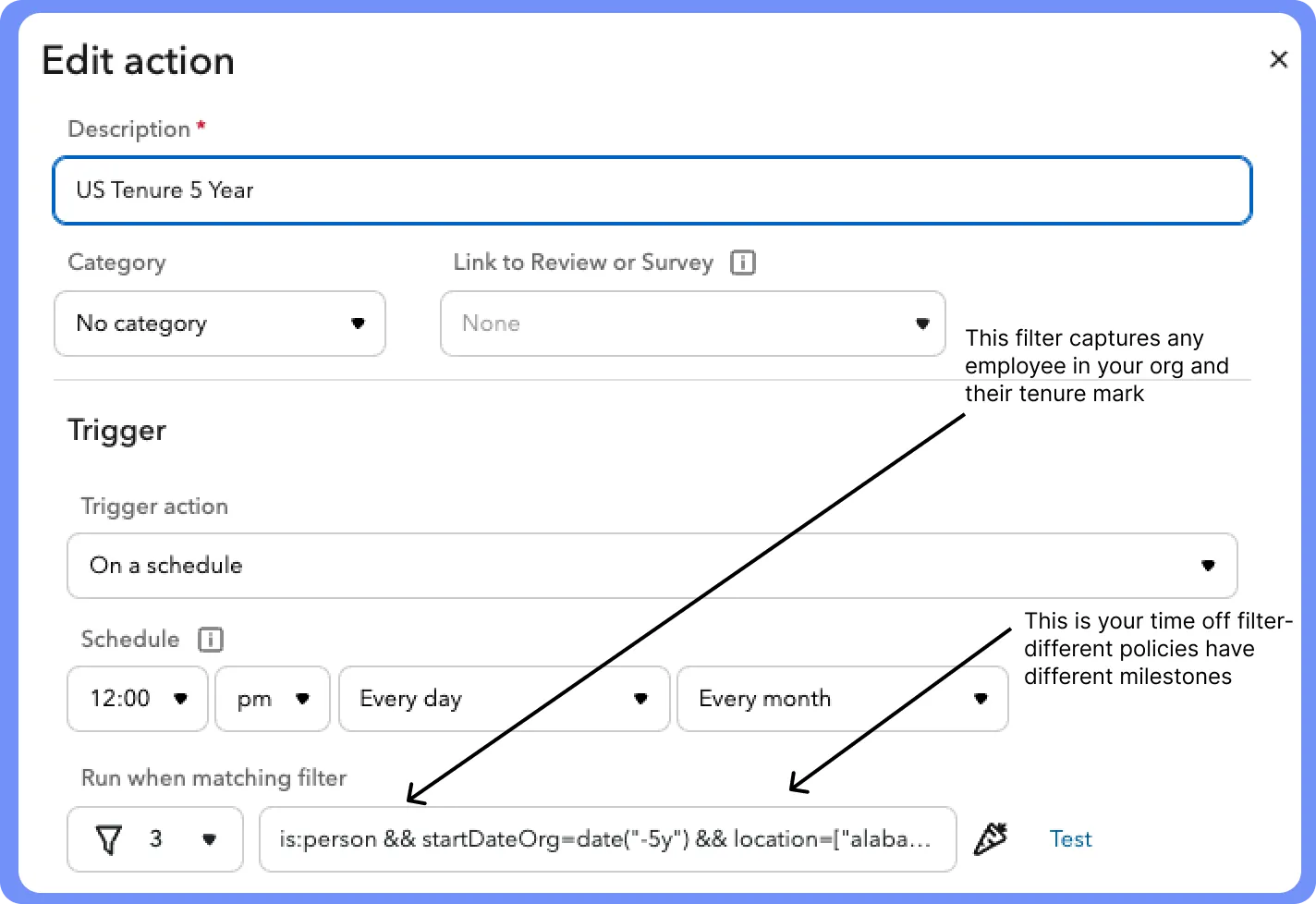
- Send a message to a person or to an email address

Message to paste:
{% assign anniv = db.job.find{it.startDateOrg=date("-15y") && it.location:"the netherlands"} %} Anniversaries: {% for person in anniv %} {{person.name}} reached their 15th year and will receive 1 additional PTO day (29) on {{person.anniversary}} {% endfor %}
This message will display:
Anniversaries:
John Smith reached their 15th year and will recieve 1 additional PTO day (29) on 9/30/35.
Albert Rodriguez reached their 15th year and will recieve 1 additional PTO day (29) on 9/30/35.
Action recipient takes:
Recipient needs to allocate the additional days to that employees balance. They can prorate it or give the full amount. See "I need to adjust an employees balance" above.
Example 2: Under 5 years tenure starts with 20 days, but between 5-10 years tenure they start with 25 days. This is awarded at the START of their 5th year. They then will start with this balance again on their 6th year, etc.
To set this up, put all employees in the same policy, and manually adjust their starting year balance accordingly. You can leverage the data sheet to give a list of employees that would apply.