Qualified Electronic Signatures (QES)
ChartHop Signatures currently follow the requiremest for simple electronic signature (SES) out of the box, but support for Qualified Electronic Signatures (QES) can be added via an add on.
If you require Qualified Electronic Signatures (QES) in order of comply with the EUs eIDAS regulation, ChartHop can add support for this for a fee. Please contact the ChartHop team for pricing and to get this setup for your account.
About QES in ChartHop
ChartHop offers QES via an integration with BoldSign.
After QES has been turned on via QES Settings, when someone who should be using QES clicks the link to sign a document, they will be taken to a hosted Boldsign page to sign.
Once they have signed, they will be redirected to ChartHop and their signed document will be saved to their ChartHop profile after the last signature is complete.
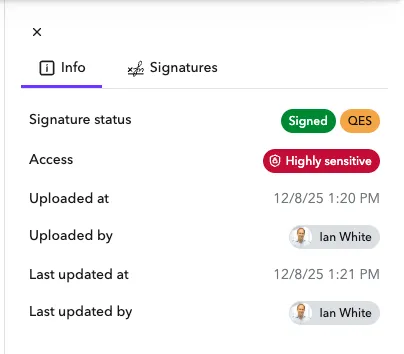
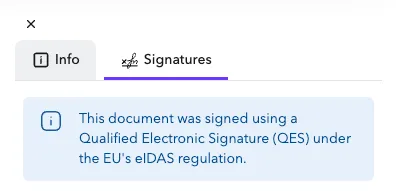
When a document has been signed with QES you will see a QES tag next to the status and a QES info note in the signature section:
QES Settings
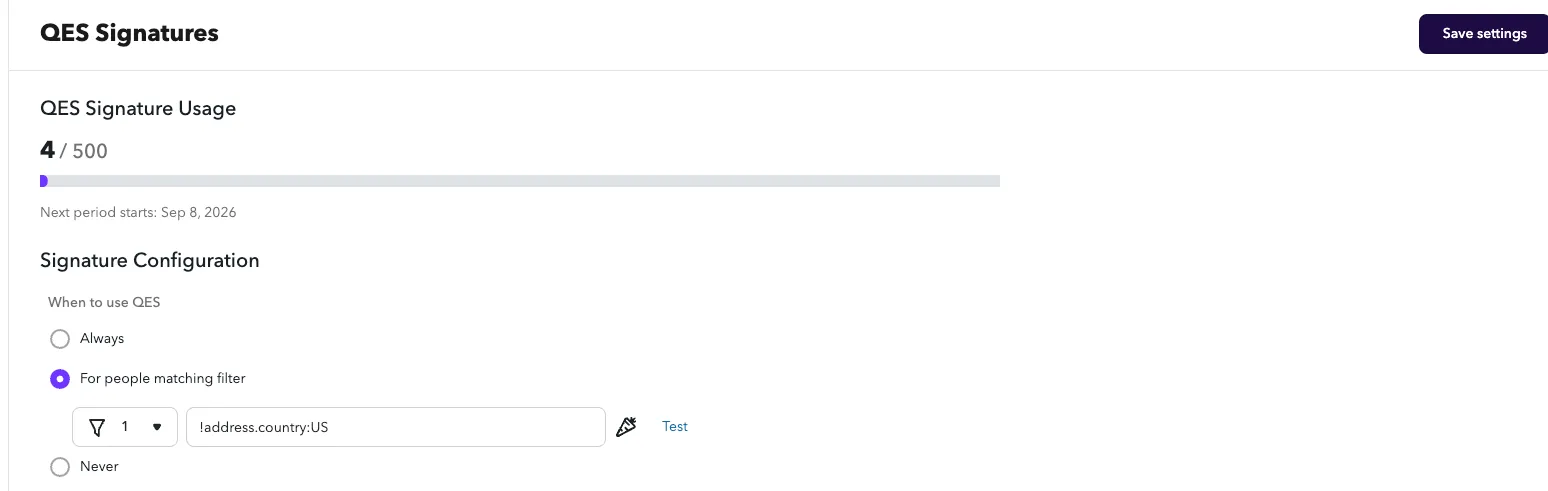
Once QES has been added to your account, you will see a QES Signatures page under Admin > QES Signatures.
The settings page will display:
- Usage Tracking — A tracker of usage depending on how many QES signatures you have used and purchased in your add on.
- Signature Configuration — When to use QES
- Always - for all signatures
- For people matching a filter - for example !address.country:US will use QES only for people who live outside of the US.
- Never - disable QES (Default to start)